Deployment proof, not just promises

Each dossier starts from a published article or solution page. iNut separates the architecture, the described outcome, and the evidence that still needs owner approval before it becomes a sales reference.

06starting dossiers
EDGEedge architecture
OPENopen sources

Know what is public today and what still needs sign-off

Each dossier exposes a source ID so an engineering team can trace it back to the original article. Acceptance metrics, field photos, and owner approval are required before it becomes a sales reference.

Technical sourceA public article or solution page that can be checked again.AVAILABLE
Acceptance metricsKPIs, deployment scope, and outcomes that can be cited.TO ADD
Reference permissionCustomer name, field photos, and approved public wording.PENDING

Starting points to test iNut against your system

This library is being standardized. The source article is the first checkpoint; acceptance metrics, field photos, and customer names appear only with approval.

Source cover for deploying SCADA and IoT over an existing Ethernet LANDOSSIER / 01

Factories & automation

SCADA and IoT over the existing Ethernet LAN

Source linkedyziepya9pdrjqkxbzo0t0zt1
Problem
The plant already has an Ethernet switch but needs PLC data, real-time monitoring, and alerts without rebuilding its signal network.
Architecture
PLC / Ethernet switch -> Modbus TCP or OPC UA -> iNut OPC / iNut PC edge -> web SCADA, Email/Telegram.
Deployed layer
iNut OPC · iNut PC · Modbus TCP · WiFi Mesh/RS485 when more field points are needed
Described outcome
Leverage the existing LAN and move data and alerts into an edge layer without replacing the whole cable system.

Published technical article; acceptance metrics and the factory name require separate approval before becoming an official reference.

Source cover for hydropower data transmission with iNut DataloggerDOSSIER / 02

Energy & water

Automated hydropower data transmission

Source linkedl8fr6j3tszksi43b0co2jki9
Problem
Hydropower data needs to be read over RS485/Modbus RTU, retained during outages, and delivered to the receiving system reliably.
Architecture
Meters / PLCs -> RS485/Modbus RTU -> iNut Datalogger Store & Forward -> FTP/MQTT -> receiving system and HMI.
Deployed layer
iNut Datalogger iC1/iC3 · Store & Forward · FTP/MQTT · dashboard/HMI
Described outcome
Automate the transmission flow and reduce the risk of missing samples when a site connection is unstable.

The source article describes the solution; an approved acceptance record or KPI is still required for public performance claims.

Lighting SCADA and leakage-current alarm diagram on FUXA PRODOSSIER / 03

Buildings & infrastructure

Lighting: monitoring, control, and leakage-current alerts

Source linkedgnc1bf0m1g0fwfzsydzpt6i6
Problem
Operators need two lighting-line states, load control, and leakage-current alerts on one screen.
Architecture
PM1125H / PLC LOGO! -> iNut Edge + FUXA PRO -> P2P dashboard -> Timer, History, and alerts.
Deployed layer
PM1125H · LOGO! Q1/Q2 · I4/I5 feedback · I3 leakage current · FUXA PRO
Described outcome
Bring control, feedback, and safety alerts into one web flow with history instead of separate tools.

The case-study article documents the technical flow; field photos and asset KPIs need owner approval.

Source cover for remote bridge and road safety monitoringDOSSIER / 04

Smart City & infrastructure

Remote bridge and road safety monitoring

Source linkedbgpb24jjesa9ggf29pk29onl
Problem
Distributed bridge and road assets need vibration, tilt, water-level, and load monitoring plus event actions at the site.
Architecture
RS485 sensors -> WiFi Mesh/LoRa/4G -> iNut edge -> dashboard -> automatic barrier, light, and siren.
Deployed layer
Vibration/tilt/water/load sensors · Mesh/LoRa/4G · solar power · buffered data
Described outcome
Bring infrastructure status into one monitoring flow with an alert path that can continue through intermittent connectivity.

The source is classified in the Buildings & Infrastructure topic; deployment scope must be confirmed before using it as a named reference.

Source cover for role-based access on iNut PCDOSSIER / 05

Factories & automation

Role-based access on iNut PC for SCADA

Source linkedix9tenxzc43y4zof8apfm79x
Problem
A SCADA system needs separate view, control, and configuration rights so each operating group can do only its assigned work.
Architecture
MQTT ClientID -> iNut PC -> Admin / Operations / Supervisor roles -> View / Control / Config permissions.
Deployed layer
iNut PC · mqtt_clientid · three operating roles · view/control/config permissions
Described outcome
Turn access control into an inspectable configuration instead of sharing one account across operating shifts.

The technical source documents the roles and permission matrix; account policy, logs, and final approval remain project-scoped.

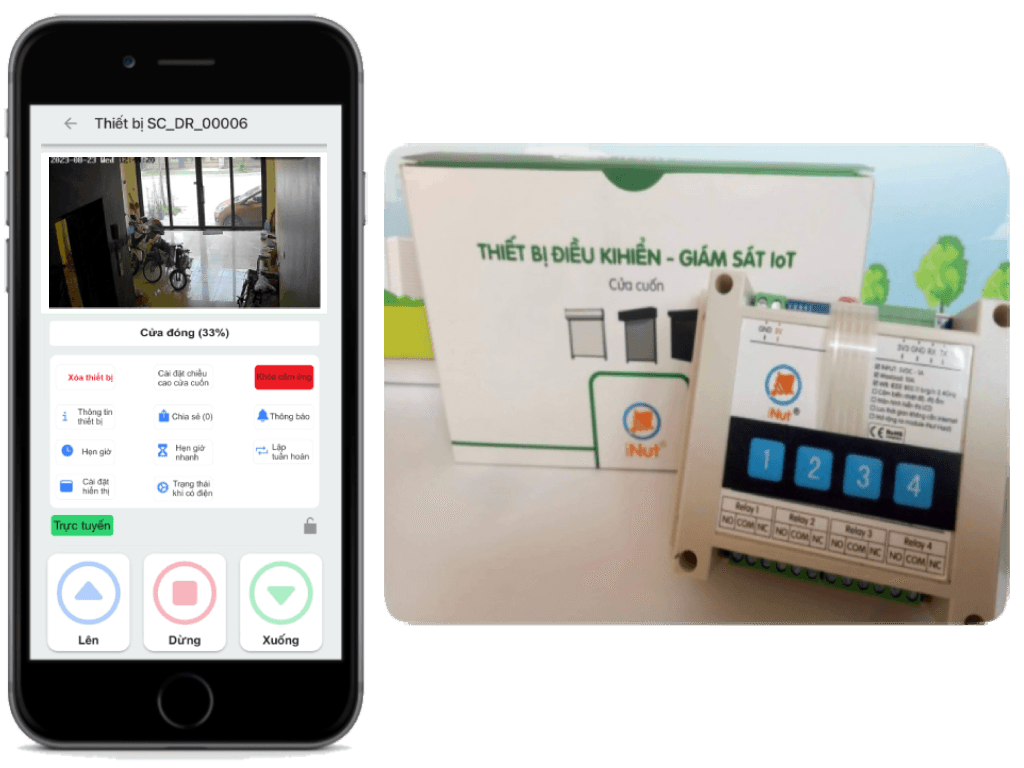
iNutdoor device for the roller shutter solutionDOSSIER / 06

Buildings & access control

Multi-user roller shutter control

Source linkedsolution:cua-cuon
Problem
A site needs phone control, user permissions, and CCTV in the same operating workflow.
Architecture
Roller shutter hardware -> iNut edge / app -> access rules and CCTV context.
Deployed layer
iNut roller shutter · app · roles and permissions · CCTV
Described outcome
A workflow that can scale from homes to shops, apartments, and multi-user sites.

This is a public solution dossier; customer names, installed points, and acceptance photos are only published with permission.

Share the real system. We will check the evidence before recommending a path.

Send a diagram, device list, or a problem that is not in the library yet. iNut will reply with the survey scope and the level of evidence we can provide.

Talk to an engineer