
Control the roller shutter where it operates
One clear control layer for the shutter: issue commands from a phone, assign user permissions and keep CCTV in context.
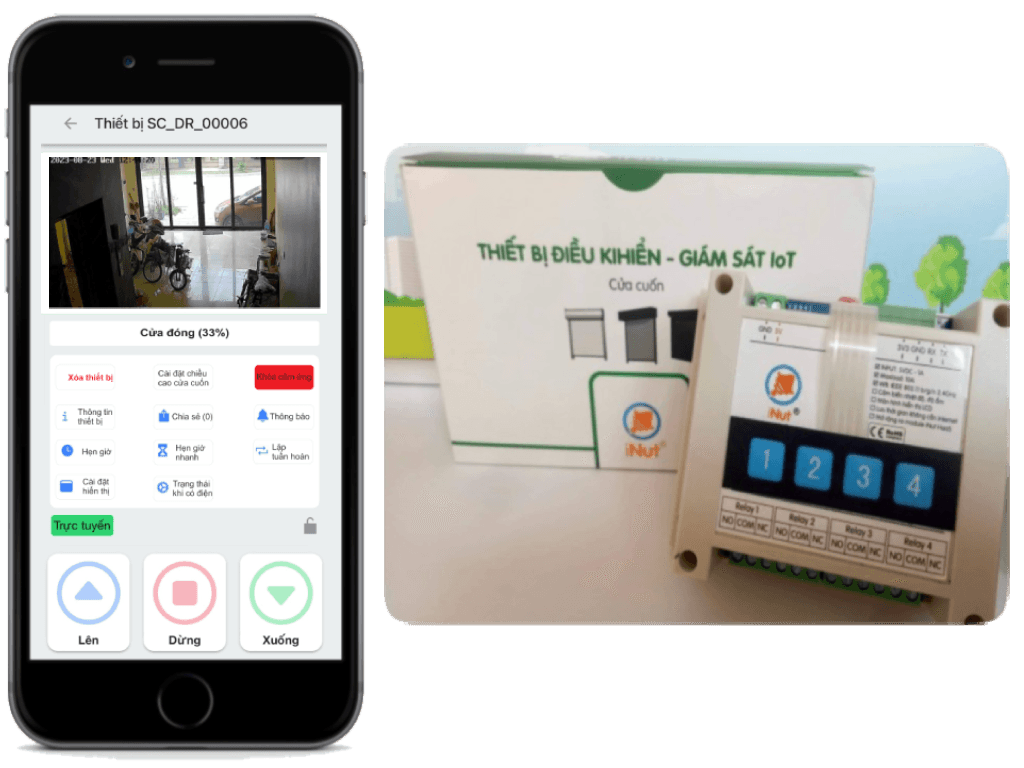
A shutter is more than an open button
When multiple people need access and the site needs visibility, the system needs a clear control layer instead of another pile of remotes.
One app instead of many remotes
Control the shutter from a phone for homes, shops and sites with multiple access points.
The right person, the right permission
Assign roles and permissions around how each site actually operates.
See before you act
Keep CCTV in the workflow so operators have context when checking the shutter.
One command through the right layers
iNut connects the app, permissions and on-site device into one flow that is easy to inspect.
Mobile application
Users act from a clear control surface.
Permission before execution
Each user stays within the access level assigned to them.
CCTV in context
See the shutter and its surroundings before handling the command.
A small interface with enough context
The common actions stay on one screen while the device and camera remain present at the site.
Clear controls
Up, stop and down commands are easy to find and act on.
Roles and permissions
Organize access around the people and workflow at each site.
CCTV in the same flow
Bring monitoring into the process instead of splitting it into another screen.
One control set for the actual problem
| CONTROL | Roller shutter via mobile app |
| ACCESS | Role-based user permissions |
| MONITORING | Integrated CCTV monitoring |
| ARCHITECTURE | App + iNut control device + roller shutter |
| DEPLOYMENT | Adapted to the existing site |
Need roller shutter control that fits how your site works?
Share the existing shutter, number of users and CCTV needs — iNut will help map the integration.